How to process PDF files on iPhone without uploading
Use PDF Tools for on-device processing: merge, compress, split, organize, protect, and convert photos to PDF directly on your iPhone. Powered by native iOS frameworks, all document operations run locally in memory without uploading your sensitive files to cloud servers or requiring user accounts.
Process documents offline in four simple steps
- Select your task
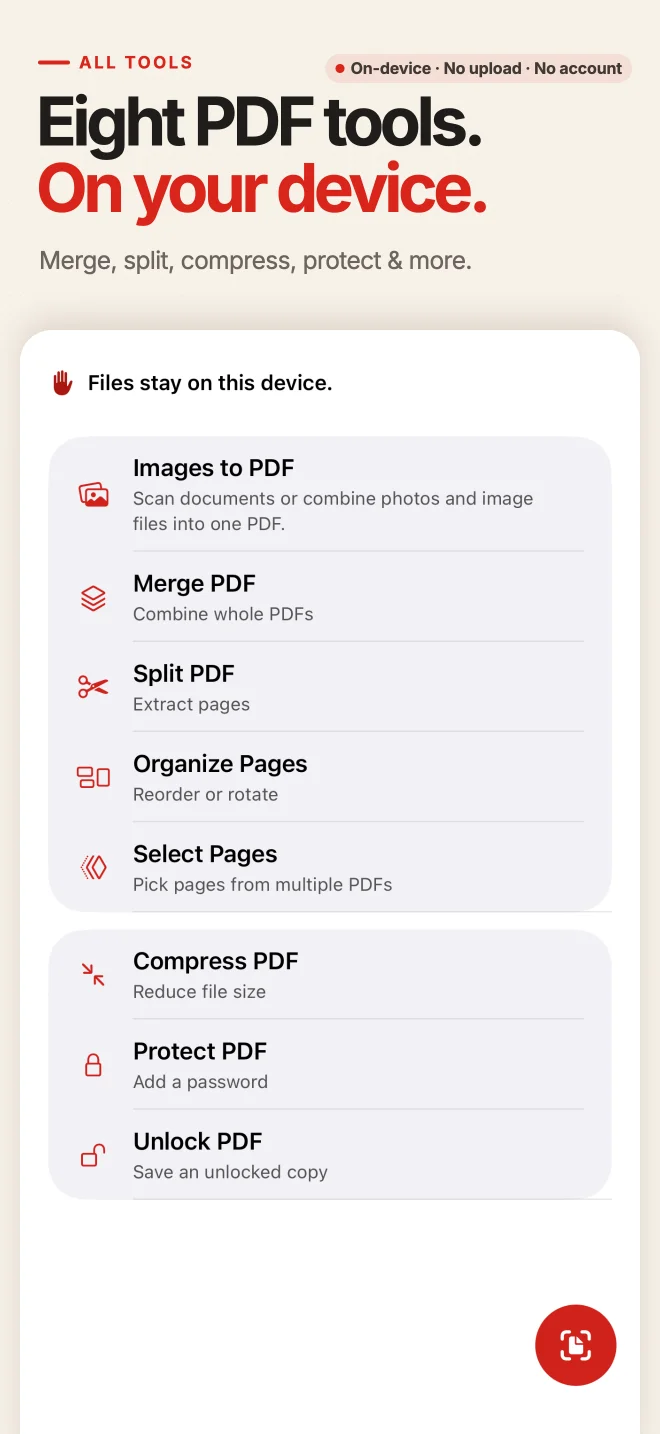
Open PDF Tools and choose from Images to PDF, Scan, Merge, Split, Organize, Compress, Protect, or Unlock.
- Pick local files
Select your documents from the iOS Files app, iCloud Drive, or your camera roll without transmitting them anywhere.
- Process locally
The app performs the operation entirely on your device using native iOS rendering and cryptography engines.
- Save your new PDF
Export the completed PDF document to Files, iCloud, or share it directly via AirDrop, Mail, or messaging apps.
Why on-device processing keeps your documents safe
Zero cloud server upload
Online PDF websites upload your sensitive contracts, financial statements, and personal records to remote servers. PDF Tools never transmits your document bytes over the network.
Full offline capability
Because all processing runs locally on your iPhone, you can merge, compress, and organize documents on flights, in low-connectivity areas, or in secure offline environments.
No accounts or identity tracking
You do not need to register, sign in, or provide an email address. The app does not track your document contents, file names, or metadata.
Original files remain intact
All operations produce clean new output files. Your source documents in the Files app or Photos library are never overwritten or altered.
Transparent tool limits and free access
Generous free quotas
Merge up to 3 files (50 pages), convert up to 10 photos, split into up to 5 files, and organize up to 50 pages for free. Protect, Unlock, and all Compress presets are completely free with no page cap.
Optional lifetime Pro upgrade
An optional one-time purchase unlocks higher batch limits for heavy workflows (such as merging up to 20 files). No recurring subscriptions or hidden recurring fees.
Supported features
Images to PDF, Document Scanner, PDF Compression, Merge PDFs, Select Pages, Split PDF, Organize Pages (reorder, rotate, delete), Password Protect, and Password Unlock.
Boundaries and what we do not do
PDF Tools focuses on file-level tasks. It does not perform OCR, text content editing, electronic signing, form filling, or PDF-to-Word conversion.
Offline PDF Tools FAQ
Do my files ever touch an external server?
No. All parsing, rendering, combining, compressing, and encryption happen strictly inside the app sandbox on your iPhone using Apple PDFKit and CoreGraphics.
Can I use PDF Tools in Airplane Mode?
Yes. The entire application operates without an active internet connection. You can process documents anytime without Wi-Fi or cellular data.
Does PDF Tools add watermarks to free output?
No. We do not insert watermarks, promotional stamps, or advertising into any of your generated PDF documents.
Are Compress and Password tools free?
Yes. Document compression, password protection, and password removal are 100% free with no page count restrictions.
Explore individual iPhone tasks
Process your PDF files privately on iPhone
Download PDF Tools from the App Store. Merge, compress, protect, and organize your documents on-device with zero cloud uploads.
This guide demonstrates the iPhone workflow. Android users can install PDF Tools via Google Play; interface details may differ.